Pentest reporting platform

Pentest reporting, without the grind.

VulnQuill turns scanner output and manual testing into reviewed findings, a client-ready report, and verified remediation. See every engagement through to verified closure, in the app or through REST and MCP.

  • From ₹1,249 for 30 days
  • Nothing auto-renews
  • Unlimited findings on every plan
Acme Payments · Web application assessment · October 2026Confidential

VQ-03 — SQL injection in the invoice export endpoint Critical

CVSS 3.19.8 — AV:N/AC:L/PR:L/UI:N/S:U/C:H/I:H/A:H
ClassificationCWE-89 · A03:2021 Injection
Affected componentapi.acme-payments.example
GET /api/v1/invoices/export?id=1042'+OR+1=1-- HTTP/1.1
HTTP/1.1 200 OK — 3,118 rows returned, 1 expected

Use parameterised queries for the export filter and reject non-numeric ids at the controller. Rotate the reporting database credential.

Retest passed · fix verified 14 Oct 2026 Page 7 of 31
remediation audit · VQ-03live
  1. created via MCP · create_finding
  2. submitted for review · rhea
  3. published · SLA due in 7 days
  4. report sent · opened twice
  5. retest passed · fix verified
An illustrative finding in VulnQuill's default report layout, as the client receives it. Reports export as PDF, DOCX, XLSX and CSV with your branding.

One finding, one path, no copy-paste between tools.

A finding enters once, from a scanner file or by hand, and moves through review, publication, delivery and retest without leaving the engagement. Every transition is recorded.

  1. Import

    Drop Nessus, Burp, Nuclei or any of 21 formats. Duplicates collapse; existing findings match.

    acme_external.nessus
  2. Write

    Score with CVSS, attach evidence, pull from 51 included templates or your own.

    CVSS 9.8 · Critical
  3. Review

    Submit for QA. Reviewers approve, send back, or withdraw, with role and scope gates.

    Approved · QA lead
  4. Publish

    Publication starts the remediation clock. Severity sets the SLA deadline automatically.

    SLA · due in 7 days
  5. Deliver

    Generate the report and send a revocable link. See who opened it and when.

    Opened · 2 views
  6. Retest

    Record passed or failed outcomes against the same finding. The audit trail stays intact.

    Retest passed

// The usual Friday

  • Paste Burp and Nessus output into a Word template by hand
  • Re-score every finding because the scanner's CVSS was wrong
  • Email a PDF, then ask the client whether anyone opened it
  • Track retests in a spreadsheet nobody else can see
  • Rebuild the whole report when one finding changes

// With VulnQuill

  • Import the files. 21 formats parse into findings with duplicates collapsed.
  • Score once. CVSS 3.1 and 4.0 calculators live on the finding.
  • Send a link. Delivery logs every open, and you can revoke it.
  • Retest in place. Outcomes attach to the same finding, with the audit trail.
  • Regenerate. Edit the finding and export the report again in PDF, DOCX or XLSX.

Know where every client stands, across every engagement.

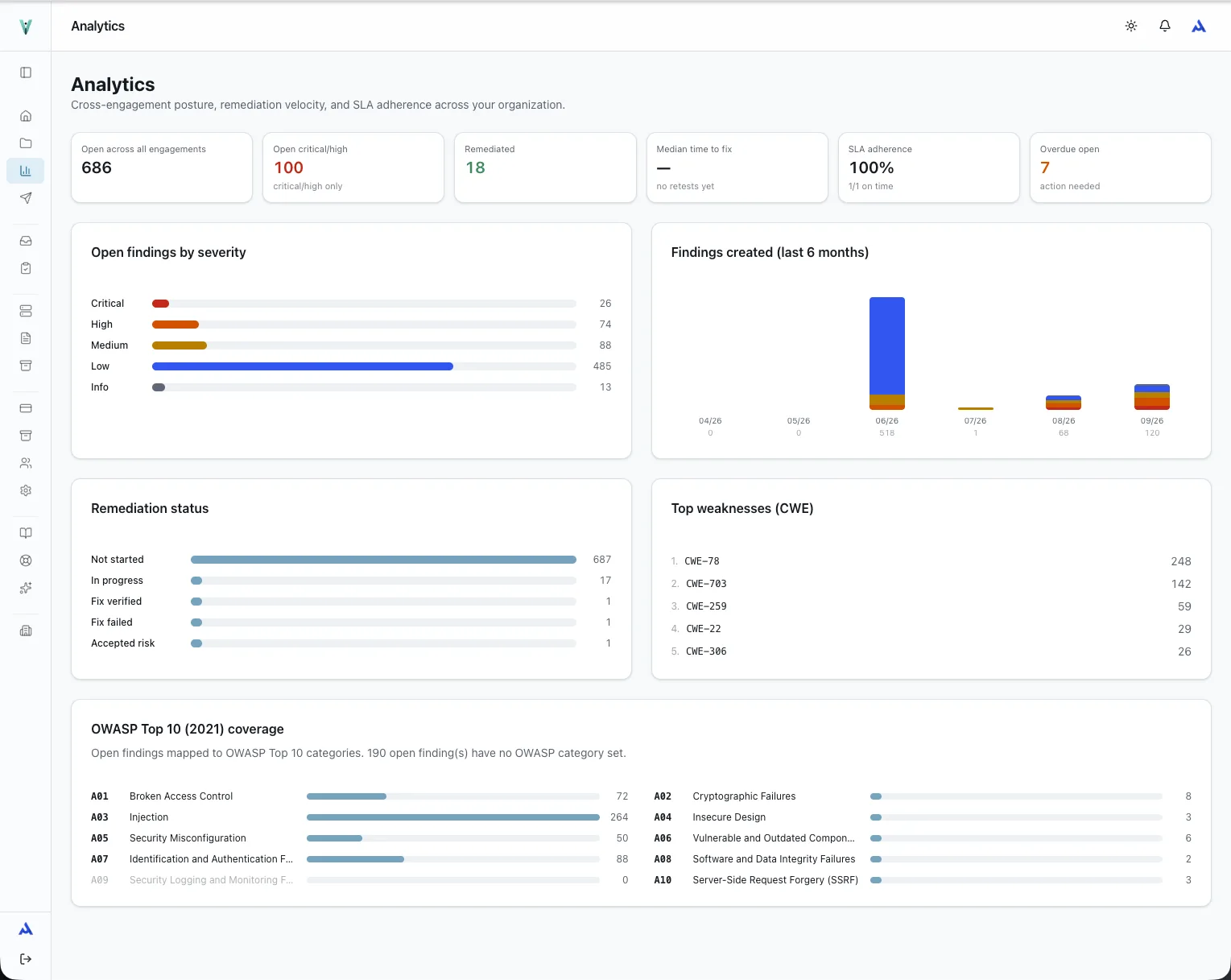
Open risk, time to fix, SLA adherence, recurring weaknesses and OWASP coverage, measured from the findings you already recorded.

  • Open findings by severity and by remediation state
  • Overdue work surfaced from published-date SLAs
  • Top CWEs and OWASP Top 10 coverage per organisation
Sanitized current VulnQuill analytics showing findings, remediation status, SLA adherence, CWE, and OWASP coverage
Current product capture: portfolio analyticsRisk, remediation, SLA

Know what reached the client and what happened next.

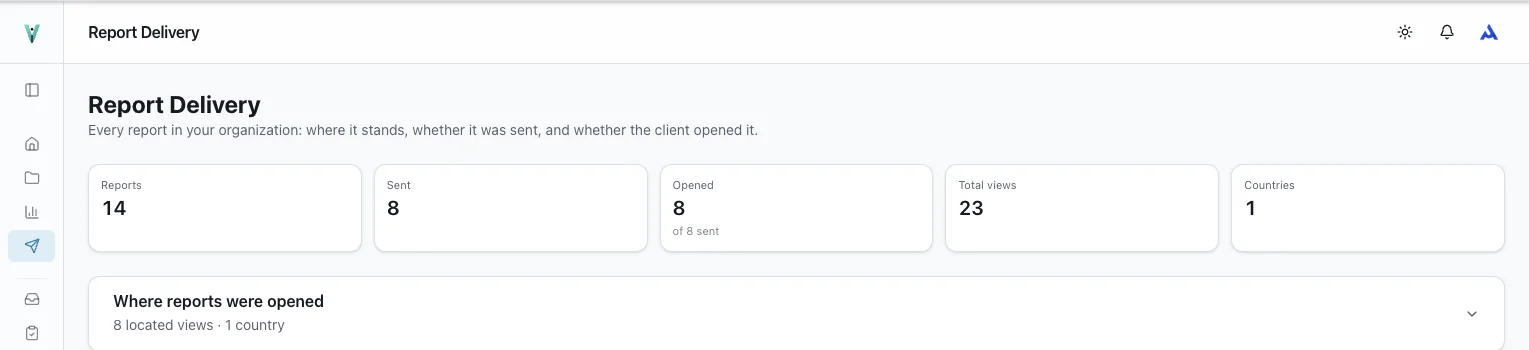
Follow every report from generation through sending and opening, without rebuilding delivery history from email threads.

  • Sent, opened, unopened, blocked, and revoked delivery states
  • Total and unique views with first and last open times
  • Passphrase-protected links and visit-by-visit access history
Sanitized current VulnQuill report delivery summary showing sent, opened, view, and country totals
Current product capture: report deliverySent, opened, viewed

Machines can move the work. Humans keep control.

Create findings, submit them for review, publish approved work, record remediation decisions, and complete retests from your own scripts or an AI agent.

  • Explicit review and publish transitions with role and scope gates
  • Passed and failed retest outcomes with a chronological audit
  • Matching REST and MCP capabilities with structured errors
  • Byte-identical retries replay safely; changed requests are rejected
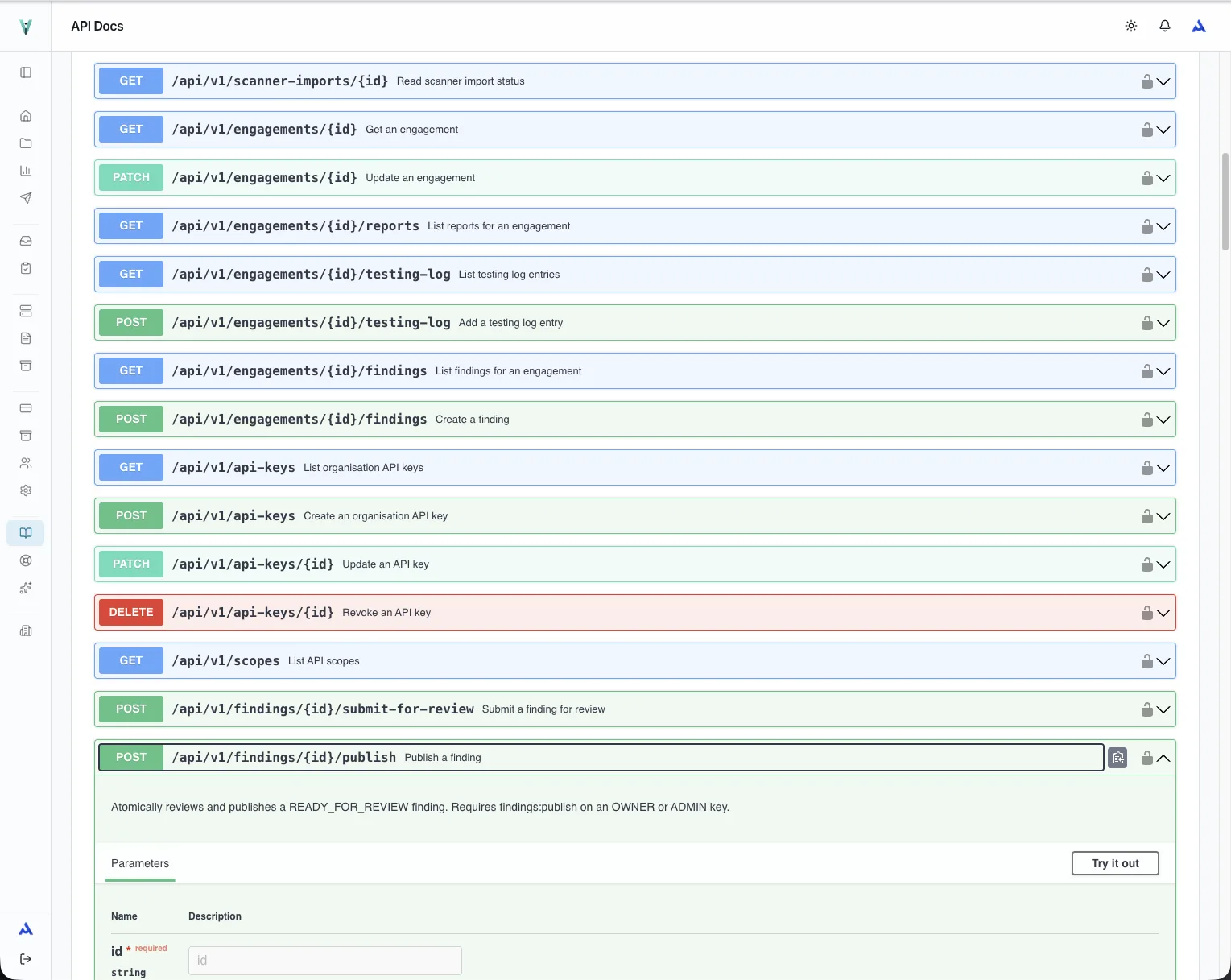
Sanitized current VulnQuill API reference showing API-key, submit-for-review, and publish operations
Current product capture: workflow APIRole-scoped, state-aware

Current workflow: create · submit for review · withdraw · publish · request retest · record outcome · decide risk · read the remediation audit.

All 21 parser families: Nuclei · Nmap · Nessus · Burp Suite · OWASP ZAP · OpenVAS · Nikto · Acunetix · Qualys · SARIF 2.1.0 · Semgrep · Trivy · CycloneDX · OWASP Dependency-Check · Snyk · Gitleaks · Checkov · Prowler · MobSF · GitLab Security · VulnQuill Generic CSV.

The operating layer around every engagement.

Every supporting system stays tied to the engagement, so a team can follow risk from discovery through verified closure.

Finding lifecycle API
Create, review, publish, remediate, retest, and audit findings through documented state-aware operations with consistent structured errors.
Recon and asset history
Discover and verify live hosts, bring selected targets into scope, and keep finding history attached to the same asset across engagements.
Methodology and proof of work
Track pass, fail, not-applicable, and not-tested outcomes; keep the raw operator log internally while recognised credential values are redacted in client-facing reports.
Remediation SLAs and retests
Start severity-based deadlines when a finding is published, record passed or failed retests, surface overdue work, and retain the full transition history.
Controlled web delivery
Share read-only reports through revocable links with optional passphrases and a visit-by-visit access log.
Portfolio visibility and intake
Measure open risk, time to fix, SLA adherence, recurring weaknesses, and OWASP coverage; turn an approved client request into a planning engagement.
Org-scoped access
Owner, pentester and client roles; team and client work stays inside engagement boundaries, with passkey sign-in on paid plans.
Sitting OSCP, CPTS or PNPT? Write the exam report here.

Every plan ships the exam report layouts alongside the standard VAPT, web application, cloud, mobile and red-team layouts. A single 30-day Solo period covers the exam write-up with PDF and DOCX export, and you keep the workspace when you start billing clients.

  • OSCP Exam ReportOffensive Security layout: scope, methodology, per-host findings, proof files.
  • CPTS Penetration Test ReportHack The Box Academy layout with attack narrative and remediation summary.
  • PNPT Penetration Test ReportTCM Security layout for the external, internal and AD assessment write-up.
  • VAPT, Web, Cloud, Mobile, Red TeamClient-facing layouts with cover, executive summary, severity charts and your branding.

Pay for 30 days or a year. Nothing auto‑renews.

Access is a one-time 30-day or annual purchase; nothing auto-renews, so there is no subscription to remember to cancel. Team includes the client portal, REST API and MCP server, features usually reserved for a top tier.

PlanBest for30-day accessSeats
SoloIndependent pentesters running unlimited engagements. All export formats, custom branding, three client logins.₹1,249₹12,490 a year1
ConsultancyGrowing consultancies with a shared delivery workflow, passkey sign-in, audit-log export and priority support.₹12,999₹1,29,990 a year50

Priced in rupees for Indian consultancies. Prices exclude GST; 18% GST is added at checkout and a GST tax invoice is issued. Pay by UPI, card or netbanking. Annual access costs ten 30-day periods.

Questions people ask before they sign up.

Is there a free plan or a trial?

No. There is no free plan and no trial. Access starts with a one-time 30-day or annual purchase of Solo, Team or Consultancy, and nothing auto-renews, so a single 30-day Solo period is the lowest-commitment way to evaluate the product. Your data stays in place between periods.

What happens when a paid period ends?

Nothing is charged, because nothing auto-renews. You keep full access until the period ends, then buy another 30-day or annual period whenever you need it, or carry on with the free plan.

Which scanner outputs can I import?

Twenty-one parser families, including Nessus, Burp Suite, Nuclei, Nmap, OWASP ZAP, OpenVAS, Qualys, Semgrep, Trivy, Snyk, Prowler, MobSF and SARIF. Duplicates collapse on import and existing findings are matched rather than recreated.

Do you support CVSS 4.0?

Yes. Findings can be scored with CVSS 3.1 or CVSS 4.0, with the vector stored alongside the score, and classified with CWE, CVE and OWASP categories.

Can I use AI to draft findings?

Yes, with your own key. VulnQuill works with Anthropic, OpenAI and Google models, or a local Ollama model. Keys are encrypted at rest and never leave your organisation's configuration.

How do Indian businesses pay?

In rupees through Razorpay: UPI, cards or netbanking. 18% GST is added at checkout and a GST tax invoice carrying our GSTIN is issued for every purchase, so input credit is straightforward.

Can my clients log in?

Yes. Clients get a read-only portal scoped to their own engagements, where they can read published findings and reply on remediation. Internal notes stay internal.

Run one engagement from scope to closure.

Pick a 30-day period on any plan, or book 20 minutes to see whether VulnQuill fits your current delivery process.